
Feature
Per-guest links with open tracking: who has seen it
One shared link tells you nothing. Give every guest their own, and the invitation knows who opened it and when.
Included on both plans. No upgrade, no guest-count band, nothing to switch on.
How a personal link works
- Each guest gets their own linkWhen you send an invitation, a personal link is generated for that guest. One link covers every event they are invited to. Nobody shares a URL with two hundred other people. Read when one shared link is enough, and when it is not.
- The invitation knows themTheir name is on it, and they only see the events they were invited to. There is no code to enter and no account to create.
- You see who has openedYour guest list shows a delivery state per guest - sent or not, opened or not - so a follow-up goes to the four people who need one.
- Their reply is already theirsBecause the link identifies the guest, an RSVP arrives attached to their name, with an answer for each event they are invited to. Nothing to match up afterwards.
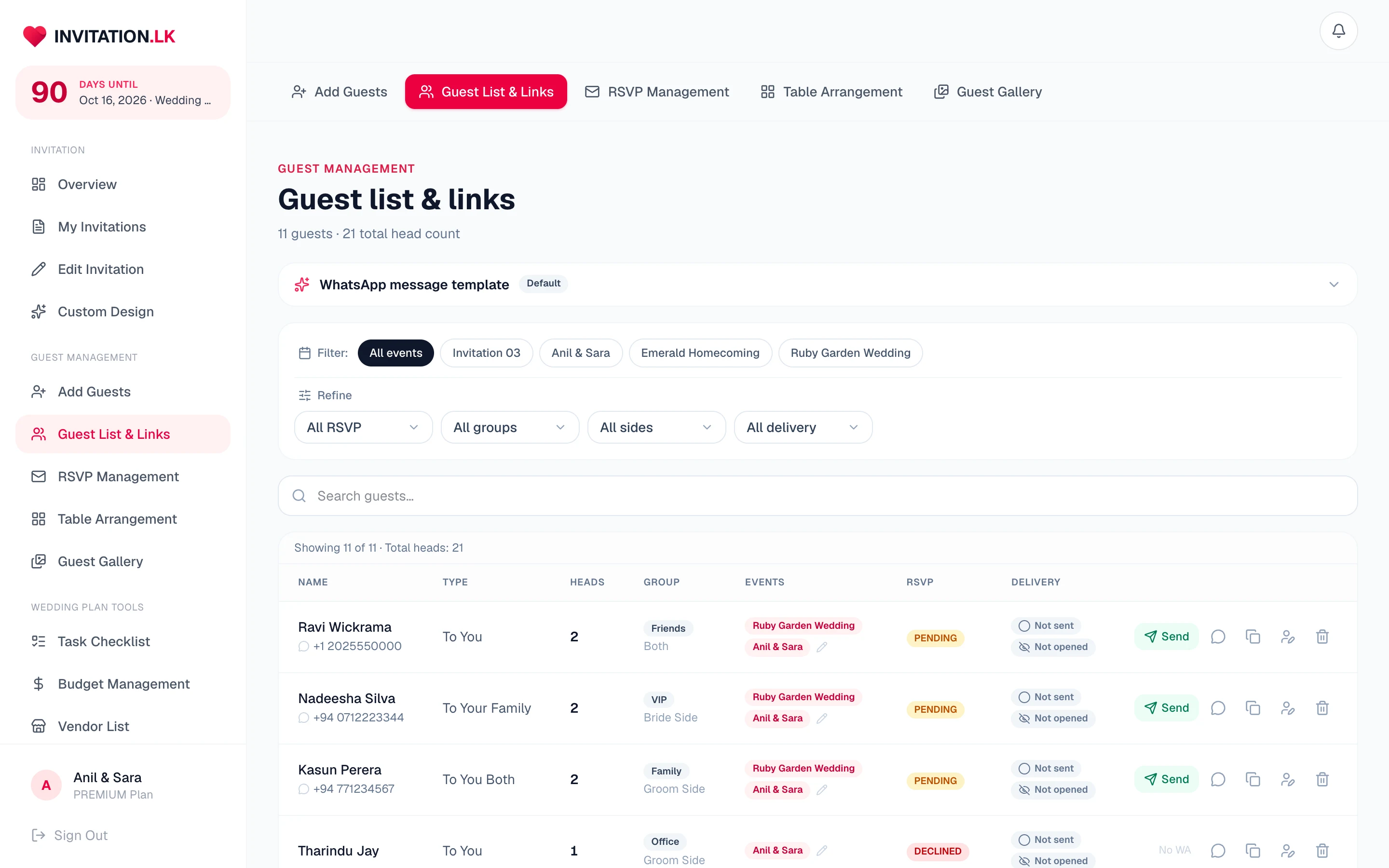
One link per guest, every event inside it
Nobody juggles a separate link for each event. A guest invited to the ceremony and the reception gets one link. It shows both events, and they reply to each one separately.
Replies stay per event
Opening the link marks the guest as opened. Their answers are still counted event by event, so the ceremony and reception head counts stay separate.
Chase the right people
Filter the list by delivery state and you have the follow-up list. No scrolling through everyone who already replied last week.
It pairs with the reply
Opened but not replied is a different problem from never opened. One needs a nudge; the other needs a working number.
See how RSVPs land →Honest about what it is
Per-guest open tracking is not something only we do: other invitation services have a version of it too. Ours is included on both plans, and it follows a personal link sent straight to WhatsApp.
We do not publish open rates for our own product, because we have not measured them. When we have, we will show the numbers.
Frequently asked
Questions couples ask
Anything not here, message us on WhatsApp and we will answer it.
Does open tracking cost extra?
No. It is included on both plans. There is no upgrade to buy for it and no guest-count band that unlocks it.
What counts as an open?
The guest opening their own invitation link. It is recorded once per guest, and it never resets: a guest who has opened stays opened.
If a guest forwards their link, whose open is it?
The guest the link belongs to. A personal link identifies the guest it was made for, so treat an open as evidence the invitation was reached, not proof of who was holding the phone.
Can a guest see that I am tracking opens?
There is nothing on the invitation about it. It is a delivery status in your dashboard, in the same way a message app shows you a message was read.
Is this unique to Link Invitation?
No, and we would rather say so. Other invitation services offer a version of open tracking too. What is different here is that it is per guest, included on both plans, and it follows a link you sent on WhatsApp.
Do I have to send the links from here?
No. You can send by WhatsApp from your dashboard, one tap per guest, or copy a guest's link and send it however you like. Tracking works either way.
Personal links are part of everything the invitation does, and the fastest way to get one to each guest is the WhatsApp send.
Stop guessing who has seen the invitation
A personal link for every guest, with open tracking included on both plans.

Free to build and preview on Essential. Unlimited guests either way.