
Digital save the dates

Digital save the dates: lock the date before the invite

One page with your names and your date, sent to each guest as their own link. They keep the day free now; the invitation with the RSVP follows when your plans are ready.

Timing

When to send save the dates

Six to twelve months before the wedding, once the date and the venue are both locked. The right point in that range depends on how far your guests have to come.

  • Nine to twelve months

    Guests flying in, or a wedding abroad. People need to plan leave and book travel, so hold the day for them as early as you can.

  • Six to nine months

    A local guest list. Early enough that weekends are still open, late enough that your plans will not move underneath it.

  • Under six months

    Skip the save the date and send the invitation itself - splitting the two this close together just delays the RSVP.

The fuller reasoning, including when a save the date is not worth sending, is in our guide to wedding invitation timing.

Designs

13 save-the-date designs, made yours in minutes

Each one is a single page that does one job: your names, your date, and a tap that puts the day in your guest’s calendar. Open any of them as a live preview before you pay.

Every design →
9:41
The Letterpress invitation design shown on a phone

Letterpress

Modern

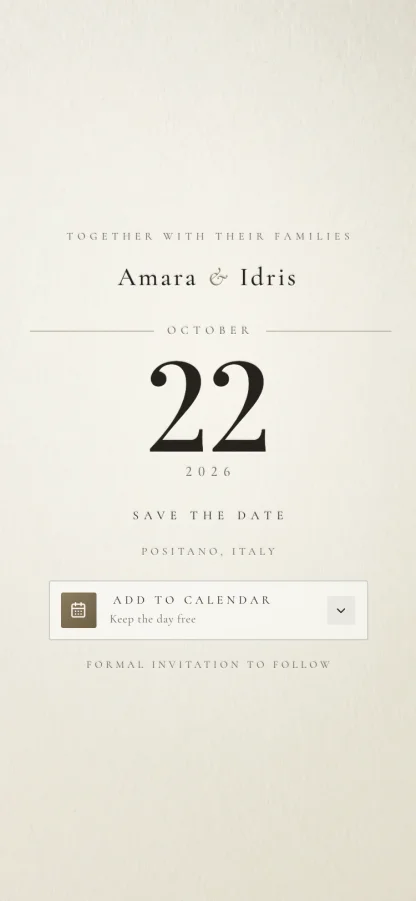
The quiet digital save the date: no photograph, no ornament, one warm ink on cotton paper. Your date is the artwork - set at display size and pressed into the page, under a hairline rule and small tracked capitals. Add to Calendar drops the day into Google, Apple or Outlook. No RSVP - that comes with the invitation.
9:41
The Postmark invitation design shown on a phone

Postmark

Modern

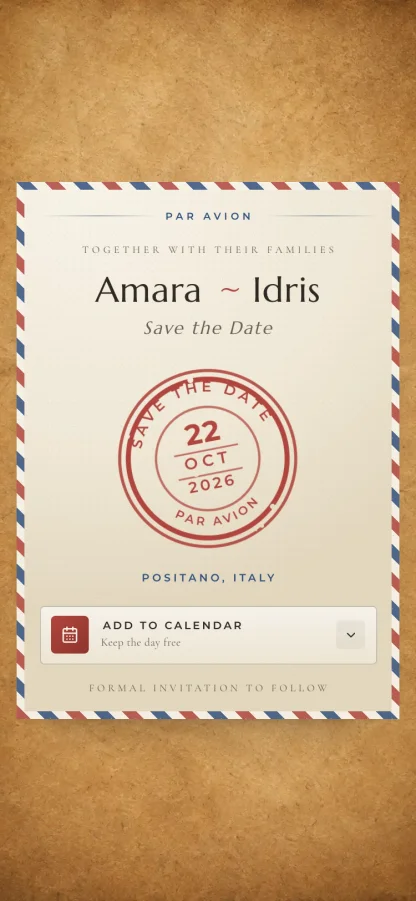
A digital save the date for a wedding abroad: an airmail postcard on kraft paper with a torn red-and-blue border, a postage stamp, and a rubber postmark that strikes down onto your date. Your destination gets its own line, and Add to Calendar drops the day into Google, Apple or Outlook. No RSVP - that comes with the invitation.
9:41
The Lucky Day invitation design shown on a phone

Lucky Day

Modern

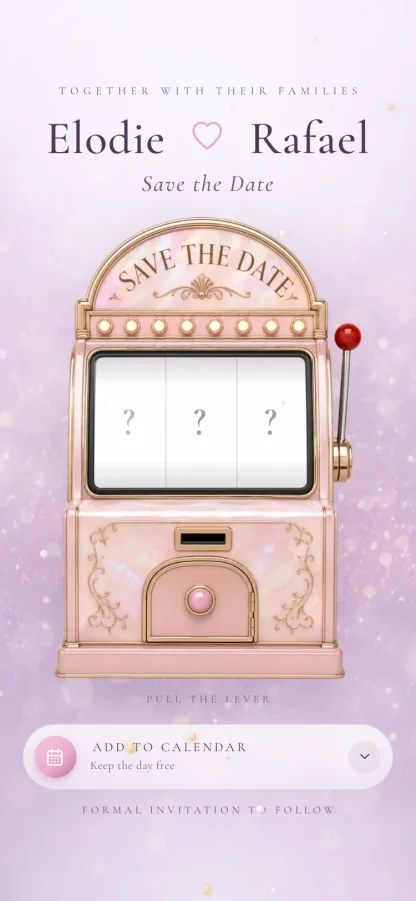
A one-page save-the-date in lilac and pearl pink: a slot machine that keeps your date to itself until the guest pulls the lever, then spins its three reels onto it. Drifting gold confetti, a pull-again replay, and an Add to Calendar card for Google, Apple and Outlook. No story, no schedule, no RSVP - just the day, and a promise that the formal invitation is coming.

9:41
The Midnight Lacquer invitation design shown on a phone

Midnight Lacquer

Luxury

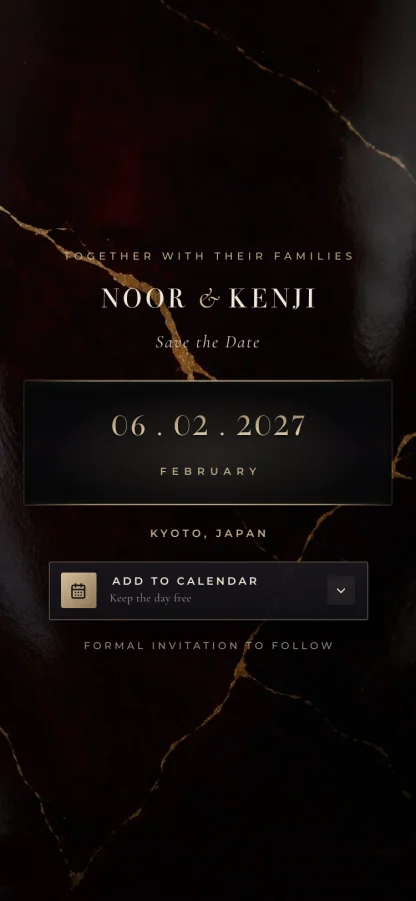
A luxury digital save the date on near-black lacquer: a slow sheen drifts across the surface, a hairline gold seam parts like a jewellery case, and your date rises engraved in pale gold. Add to Calendar drops the day into Google, Apple or Outlook. No RSVP - that comes with the invitation.
9:41
The Trellis invitation design shown on a phone

Trellis

Garden

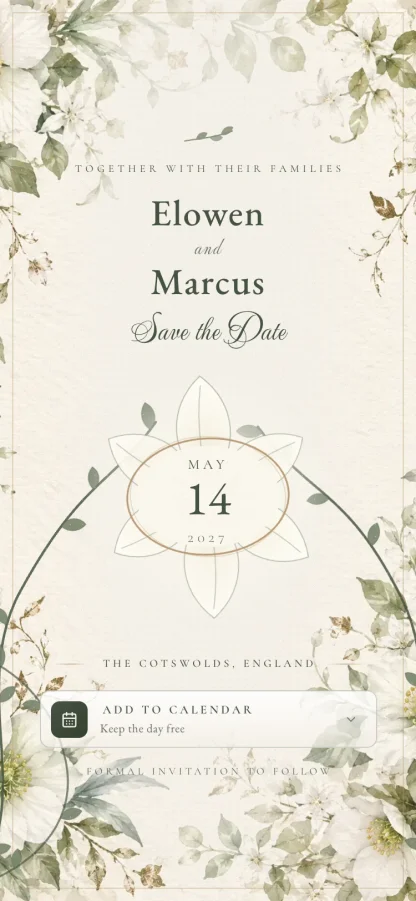
A hand-painted botanical save the date: watercolor hellebore and jasmine frame the page, fine vines draw themselves inward, and a closed bud blooms open to reveal your date in an oval frame. Add to Calendar drops the day into Google, Apple or Outlook. No RSVP - that comes with the invitation.
9:41
The Moonrise invitation design shown on a phone

Moonrise

Romantic

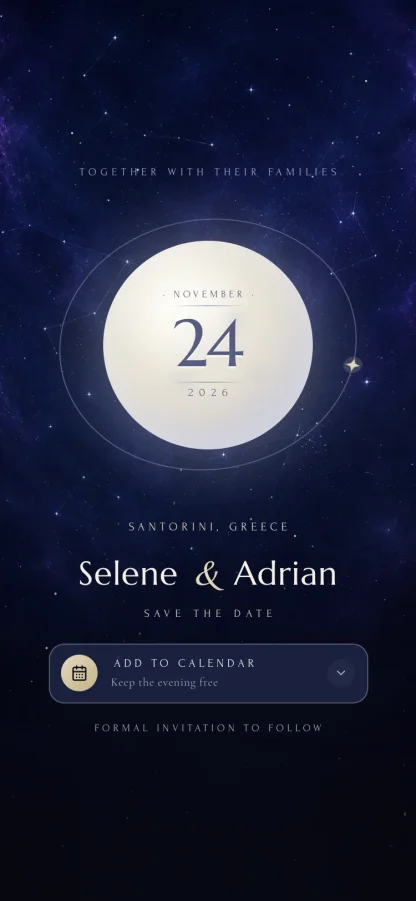
A celestial digital save the date: one oversized pearlescent moon carries your date on its face, a hairline orbit ring circles it with a single gold star, and a tap sends a soft eclipse across. Add to Calendar drops the day into Google, Apple or Outlook. No RSVP - that comes with the invitation.
9:41
The The Palazzo invitation design shown on a phone

The Palazzo

Classic

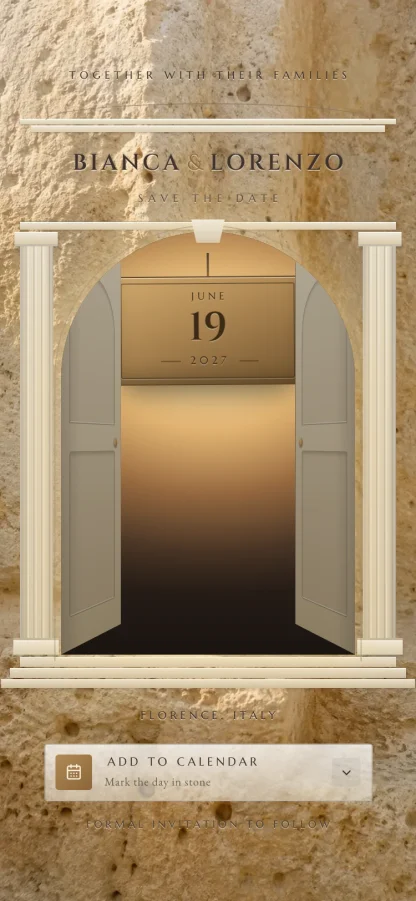
An architectural save the date: a classical limestone doorway with your names incised over the arch, whose carved stone doors part onto a candlelit interior holding your date on a bronze plaque. Add to Calendar drops the day into Google, Apple or Outlook. No RSVP - that comes with the invitation.
9:41
The Silken Vow invitation design shown on a phone

Silken Vow

Romantic

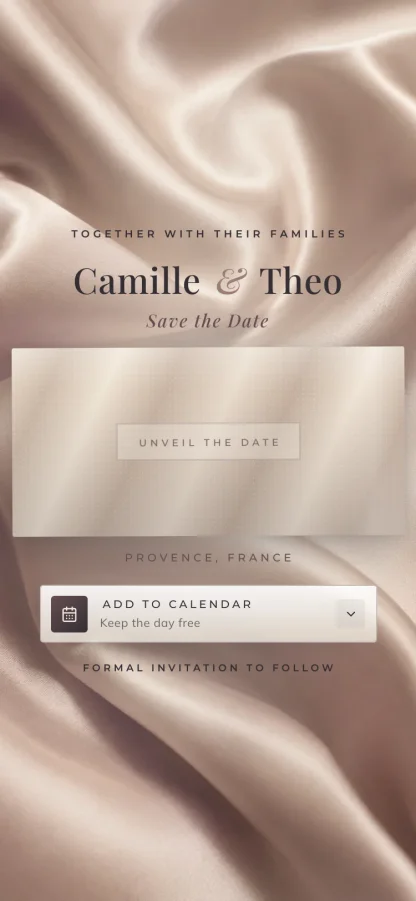
A couture digital save the date: champagne silk drapes the whole screen, and a satin curtain pulls aside at a touch to reveal your date debossed tone-on-tone in the cloth beneath. Add to Calendar drops the day into Google, Apple or Outlook. No RSVP - that comes with the invitation.
9:41
The Ink Reverie invitation design shown on a phone

Ink Reverie

Minimal

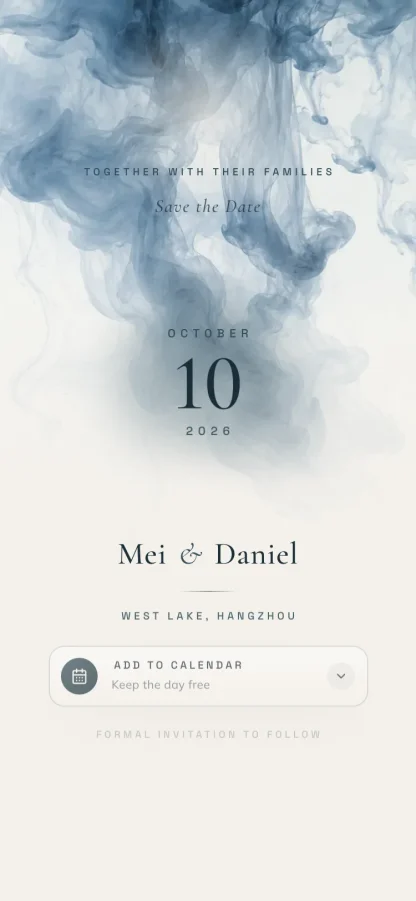
A meditative digital save the date: a drop of blue-grey ink falls into pale water and your date condenses out of the bloom, blurred to sharp. The quietest of the set on purpose. Add to Calendar drops the day into Google, Apple or Outlook. No RSVP - that comes with the invitation.
9:41
The Gilt Edge invitation design shown on a phone

Gilt Edge

Luxury

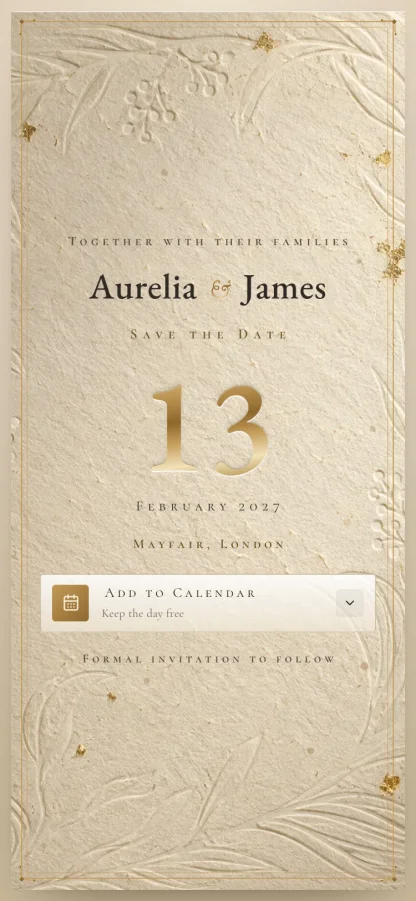
A gold-foil digital save the date: your date pressed huge into cotton-rag paper in gleaming antique gold, a specular sweep passing across the numerals as though the sheet were catching the light. Add to Calendar drops the day into Google, Apple or Outlook. No RSVP - that comes with the invitation.
9:41
The Cover Story invitation design shown on a phone

Cover Story

Modern

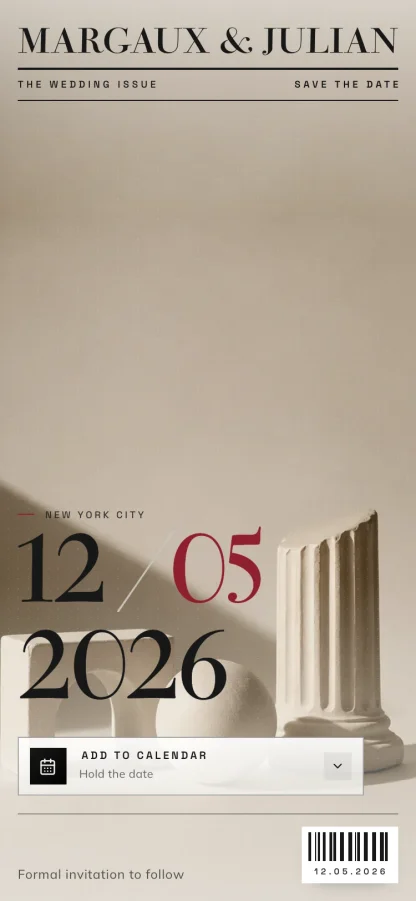
A fashion-magazine save the date: your names set as the masthead, your date as giant editorial numerals with one group in carmine, cover lines down the edge and a drawn barcode. Tap the date to restyle the cover. Add to Calendar drops the day into Google, Apple or Outlook. No RSVP - that comes with the invitation.
9:41
The Crystal Tide invitation design shown on a phone

Crystal Tide

Beach

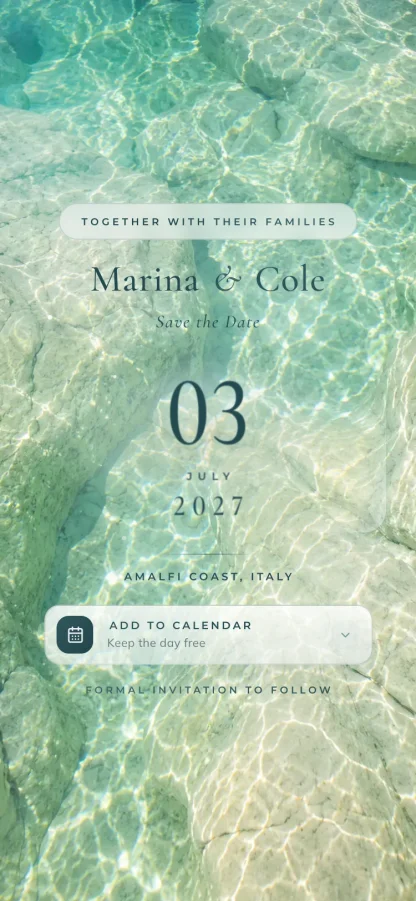
A riviera save the date seen straight down through sunlit shallow water: your date lies on pale stone beneath drifting caustic light, and a tap blooms ripple rings from your fingertip. Add to Calendar drops the day into Google, Apple or Outlook. No RSVP - that comes with the invitation.
9:41
The The Medallion invitation design shown on a phone

The Medallion

Luxury

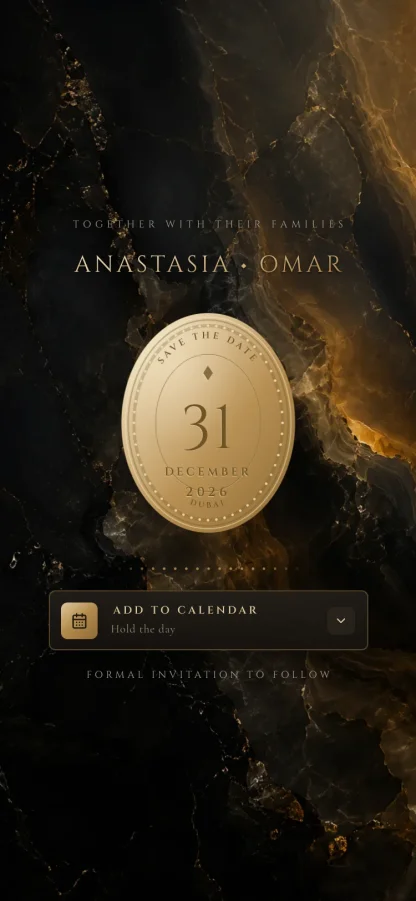
A jewellery-grade save the date: an engraved gold oval floats over black onyx, your interlocked monogram on one face and your date on the other, flipping with a halo of light at a tap. Add to Calendar drops the day into Google, Apple or Outlook. No RSVP - that comes with the invitation.

9:41
Custom Design

Have a unique vision? Work with our designers to create something one-of-a-kind.

Request Custom Design

Custom Design

1 OF 1

Skip the templates. Our designers craft an invitation no one else will have, built around your story.

Request Design

From held date to sent invitation

  1. Send the save the datePick a design, add your names and your date, and send each guest their own link on WhatsApp or by text.
  2. Guests keep the dayOne tap adds the date to their calendar - Google, Apple or Outlook. No RSVP yet, because you are not asking for one yet.
  3. The invitation followsWhen the plans are set, send the full invitation with your events, maps and RSVP, and watch the replies land in one dashboard.

What a digital save the date does

  • A link for every guest

    Each save the date is addressed to the guest who opens it - not a group blast, and not a forward.

  • Straight into their calendar

    Add to Calendar works with Google, Apple and Outlook, so the day is held where they will actually see it.

  • See who has opened it

    Know who has seen the date and who a reminder should go to, guest by guest.

  • Change it after sending

    It is a live page. If the plan moves, update once and the same link shows the new version to everyone.

  • Sent where they will read it

    Deliver each link on WhatsApp with a message you write, or share it by text or any other way.

  • However many guests

    Unlimited guests on every plan, so holding the date for three hundred people costs the same as thirty.

One payment. However many guests.

Essential is $29 and you build it yourself. Excellence is $99 and we design it around you. Both include unlimited guests, and you only pay when you are ready to send.

See what each plan includes
Frequently asked

Questions couples ask

Anything not here, message us on WhatsApp and we will answer it.

When should we send save the dates?

Six to twelve months before the wedding, and as soon as the date and venue are both locked. Guests who will need flights or leave sit at the early end of that range.

Do we need save the dates at all?

Only if there is a real gap between knowing your date and being ready to invite properly. If your invitations are going out nine months ahead anyway, a save the date is an extra step you can skip.

What is the difference between a save the date and the invitation?

A save the date holds the day: the two names, the date, and the town or country if guests will travel. The invitation follows later with the venues, the schedule and the RSVP.

Can guests RSVP on a save the date?

No, and that is deliberate. A save the date asks guests to keep the day, not to commit to it. They can add the date to their calendar in one tap, and the reply comes with the invitation.

How do guests receive it?

As their own link. Send it on WhatsApp from your dashboard, by text, or any way you like - it opens on any phone with nothing to install.

Can we change it after sending?

Yes. A save the date is a live page, so if the plan moves you update it once and every guest sees the current version at the same link.

When you are ready for the next step, see what a full digital wedding invitation includes, how replies land in a live RSVP dashboard, and every design in the gallery. And if a held date ever has to move, there is a page for that too: wedding postponement announcements.

Hold the date while the plans catch up

Build your save the date free, preview it as your guests will see it, and pay once when you send.

Start your save the date

No card needed to build it. Refunds are available before design work begins.