Postponement announcements

Wedding postponement announcements, sent with love

One page that tells every guest the day has moved: your names, the new date, and a tap that puts it in their calendar. No explanations owed, no RSVP yet - the updated invitation follows when your plans are ready.

Wording

How to announce a wedding postponement

Say three things, kindly and briefly: the wedding is postponed, the new date if you have one, and that an updated invitation is coming. Everything else is optional.

  • Send it as soon as you decide

    The announcement can go out the day the decision is made - guests with flights and leave to rearrange will thank you for every week of notice.

  • A new date is not required

    If the new day is not set, announce the postponement now with the date to follow. The page is live, so you update it once and the same link shows the new date to everyone.

  • Skip the reason if you like

    You owe no one an explanation. A warm line - our plans have changed, our love has not - carries the whole message.

Three wordings that work

  • Our wedding day has moved. The new date is 30 January 2027, and everything else stays the same.
  • With heavy hearts and a light step, we are postponing. The new date will follow the moment it is set.
  • Same venue, same us, new date: 14 November 2026. An updated invitation is on its way.
Designs

5 change-the-date designs, none of them sombre

A struck-through date circled in red, a telegram, a night sky, a rain check, a pressed-flower sheet - five different ways to announce a wedding postponement, each with its chin up. Open any of them as a live preview before you pay.

Every design →
9:41
The Change of Plans invitation design shown on a phone

Change of Plans

Announcement

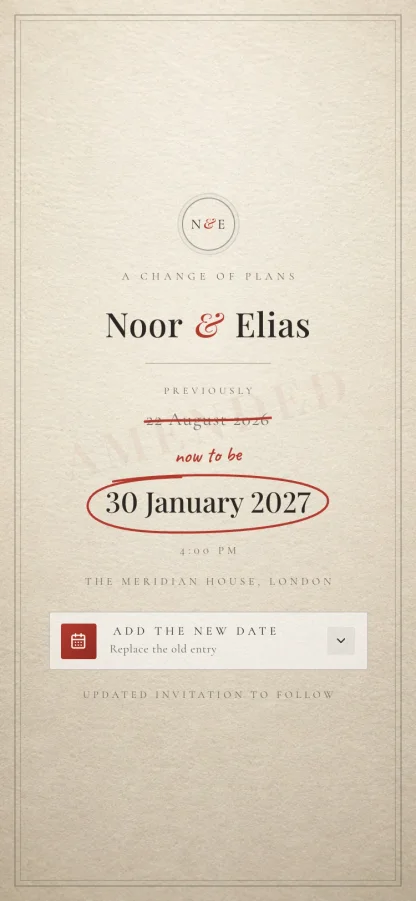
A one-page wedding postponement notice, marked up like a proof sheet: your original date struck through in red editor's ink, the new date circled by the same hand, both strokes drawing themselves on ivory cotton. Add to Calendar saves the new date to Google, Apple or Outlook. No RSVP - the reply belongs to the updated invitation.
9:41
The Telegram invitation design shown on a phone

Telegram

Announcement

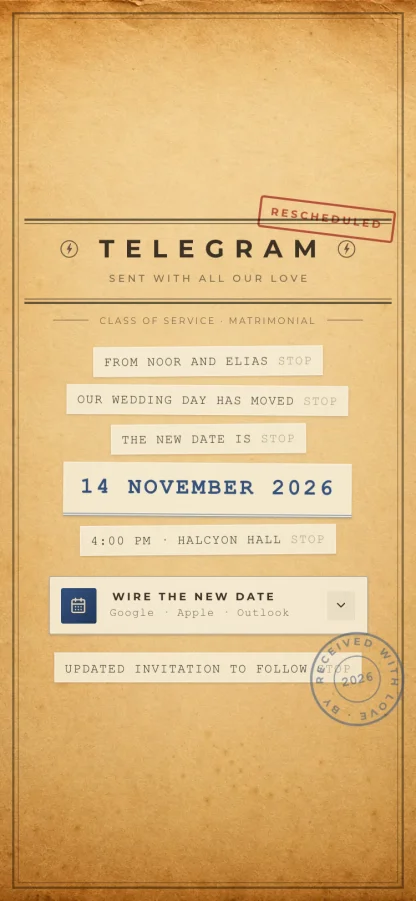
A wedding postponement announcement sent by wire: a 1930s telegram form on aged manila, the news arriving as typed strips in typewriter capitals - OUR WEDDING DAY HAS MOVED STOP - a red RESCHEDULED stamp over the masthead, and Add to Calendar for Google, Apple and Outlook. No RSVP - the updated invitation carries the reply.

9:41
The Worth the Wait invitation design shown on a phone

Worth the Wait

Announcement

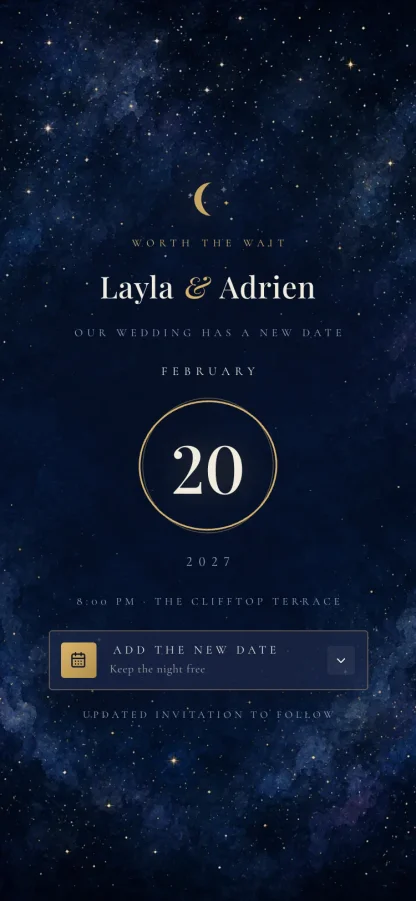
A romantic one-page date change announcement after dark: a gouache night sky, a thin gold crescent, drawn stars on a slow twinkle, and your new date held inside a hand-ringed gold ellipse like a full moon. Add to Calendar keeps the new night free in Google, Apple or Outlook. No RSVP - that comes with the updated invitation.

9:41
The Rain Check invitation design shown on a phone

Rain Check

Announcement

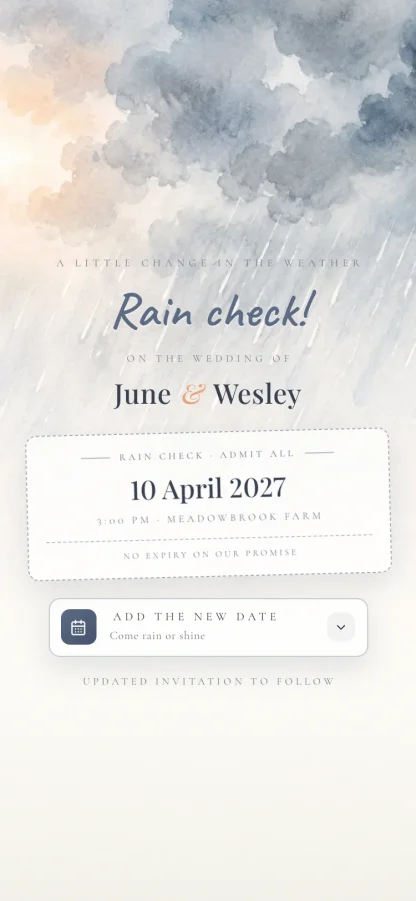
A tender, playful wedding postponement card: watercolor rain falls out of the top of the page, a handwritten rain check does the announcing, and the new date is printed on a ticket stub that admits everyone you love - no expiry on the promise. Add to Calendar for Google, Apple and Outlook. No RSVP - the updated invitation asks that.

9:41
The Still Blooming invitation design shown on a phone

Still Blooming

Announcement

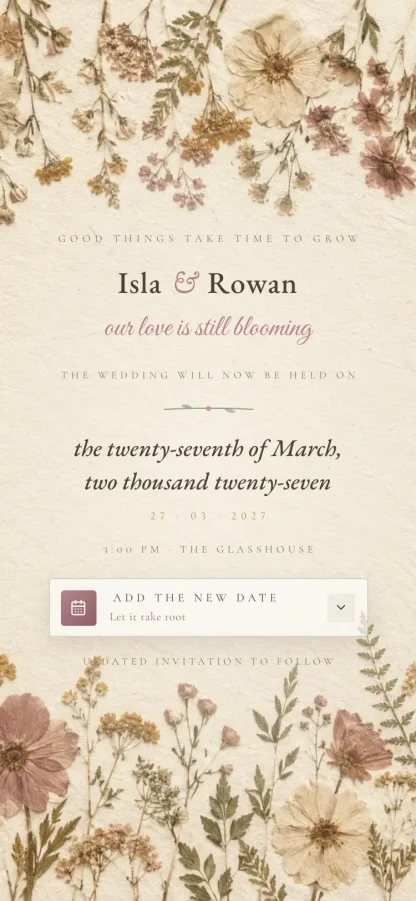
The classical postponement announcement: pressed wildflowers border a sheet of handmade paper and the new date is spelled out in words, engraved-style - the twenty-seventh of March, two thousand twenty-seven - with a small numeric echo in gold. Add to Calendar for Google, Apple and Outlook. No RSVP - the updated invitation collects it.

9:41
Custom Design

Have a unique vision? Work with our designers to create something one-of-a-kind.

Request Custom Design

Custom Design

1 OF 1

Skip the templates. Our designers craft an invitation no one else will have, built around your story.

Request Design

From moved date to updated invitation

  1. Announce the changePick a design, add the new date - or mark it as to follow - and send each guest their own link on WhatsApp or by text.
  2. Guests hold the new dayOne tap adds the new date to their calendar - Google, Apple or Outlook. No RSVP yet, because you are not asking for one yet.
  3. The updated invitation followsWhen the plans are settled, send the full invitation with your events, maps and RSVP, and watch the replies land in one dashboard.

What a postponement announcement does

  • A link for every guest

    Each announcement is addressed to the guest who opens it - not a group blast, and not a forward.

  • The new date, one tap away

    Add to Calendar works with Google, Apple and Outlook, so the new day is held where guests will actually see it.

  • See who knows

    Open tracking shows who has seen the announcement and who still thinks the wedding is on the old date.

  • Update it as plans firm up

    It is a live page. Announce first, add the new date when it is set, and the same link stays current for everyone.

  • Sent where they will read it

    Deliver each link on WhatsApp with a message you write, or share it by text or any other way.

  • However many guests

    Unlimited guests on every plan, so telling three hundred people costs the same as telling thirty.

One payment. However many guests.

Essential is $29 and you build it yourself. Excellence is $99 and we design it around you. Both include unlimited guests, and you only pay when you are ready to send.

See what each plan includes
Frequently asked

Questions couples ask

Anything not here, message us on WhatsApp and we will answer it.

What should a wedding postponement announcement say?

Three things: that the wedding is postponed, the new date if you have one, and that an updated invitation will follow. Keep it warm and brief - the announcement holds the change, the invitation that follows holds the detail.

Do we have to give a reason?

No. You owe no one an explanation, and most announcements read better without one. If you want to acknowledge it, one warm line is plenty.

What if we do not have a new date yet?

Send the announcement without one - the designs read naturally with the new date left as 'to follow'. It is a live page, so when the date is set you update it once and every guest sees it at the same link.

Do guests RSVP on a postponement announcement?

No, and that is deliberate. The announcement asks guests to hold the new date, not to commit to it. The updated invitation follows with the schedule and the RSVP.

Will the date change in guests' calendars?

One tap adds the new date to Google, Apple or Outlook. The old entry is theirs to remove - no invitation system can reach into a guest's calendar and edit it, so the announcement asks them plainly.

How do guests receive it?

As their own link. Send it on WhatsApp from your dashboard, by text, or any way you like - it opens on any phone with nothing to install, and you can see who has opened it.

When the new plan is ready, see what a full digital wedding invitation includes and how replies land in a live RSVP dashboard. Announcing a date for the first time instead? That is a save the date.

The plan moved. Tell everyone beautifully.

Build your announcement free, preview it as your guests will see it, and pay once when you send.

Start your announcement

No card needed to build it. Refunds are available before design work begins.