
Guest management
Wedding guest list manager: one list, every event
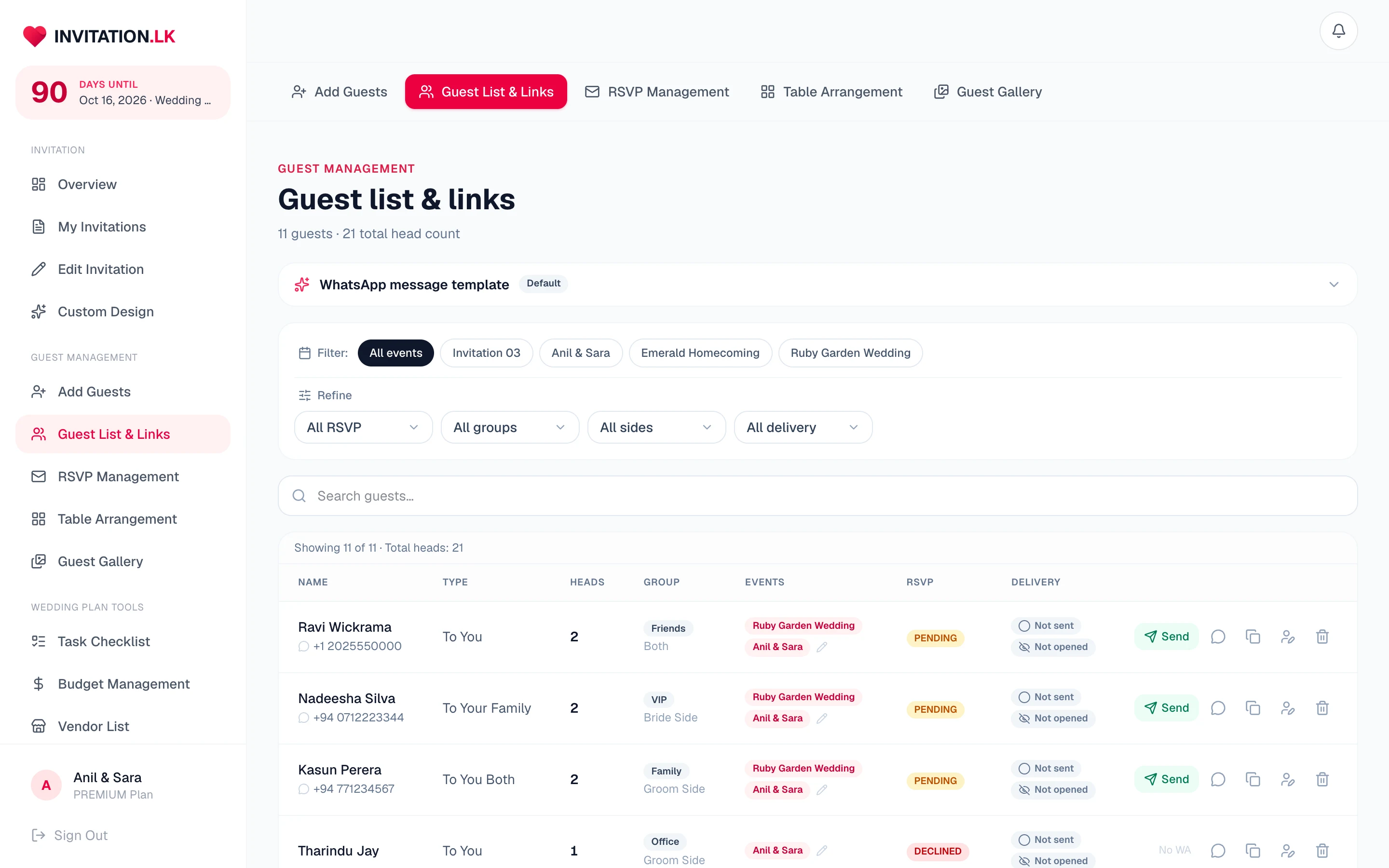
Your guest list, your invitations and your replies are the same list. Tag people by side and group, put them on the events they are actually invited to, and watch the RSVPs land on the row they belong to.
Unlimited guests on both plans. The size of your list never changes the price.
On every row
A list that knows who these people are
Sides and groups
Tag each guest by side and by group - family, work, university - then filter the list by either when you need one slice of it.
Per-event invitations
Assign each guest to the events that apply to them. Their invitation shows those events and nothing else.
Head counts that vary
A guest can bring two to the reception and come alone to the ceremony. The count is per event, not one number for the whole wedding.
Invited to you, or to you both
The invitation addresses a single guest or a couple, so the wording is right without you rewriting it each time.
Approve public sign-ups
Anyone signing up through your public page arrives pending. Nothing counts towards your numbers until you say so.
Delivery state per guest
Sent or not sent, opened or not opened, on the same row as their reply. Sending from your dashboard on WhatsApp marks each guest off as you go. Your follow-up list writes itself.
Search and filter
Filter by RSVP state, group, side or delivery, and search by name when you just need one person.
Export to CSV
Hand a clean list to the caterer or the venue when they ask for final numbers.
Importing and tracking your guests
Add guests one at a time in the dashboard, or import them from a spreadsheet: download the Excel or CSV template, or upload your own sheet and the columns are matched by name. Every row is checked before it is added, so you fix or skip the flagged ones, and duplicates of guests already on your list are skipped. From then on each row tracks that guest’s invitation, from sent to opened to replied, and you can export the list to CSV whenever you need it.
Why the list and the invitation should be the same thing
Most couples run a spreadsheet next to whatever they used to send the invitation. That is where the evening goes.
No reconciling two lists
When replies arrive somewhere other than your guest list, somebody has to merge them. Here the reply lands on the guest's own row, for the event they replied about.
Numbers you can hand over
Attending, declined and still pending, per event, without counting rows by hand the week the caterer asks.
See how replies arrive →The seating plan reads it
Arrange the same guests into named tables with seat limits, and update it as replies come in.
Open the seating chart maker →What it does not do
There is no import from your phone contacts at the moment. Spreadsheets import, and export is there when you need to take the list elsewhere.
Frequently asked
Questions couples ask
Anything not here, message us on WhatsApp and we will answer it.
Is there a limit on guests?
No. Both plans carry unlimited guests. The size of your list does not change what you pay.
Can I import my contacts or a spreadsheet?
Yes, from a spreadsheet: download the Excel or CSV template, or upload your own sheet. There is no import from your phone contacts. You can export your finished list to CSV whenever you want it, for the caterer or the venue.
Can one guest be invited to some events but not others?
Yes, and this is the point of the list. Each guest is assigned to the events that apply to them, and their invitation only shows those.
How do plus-ones work?
Each guest carries a head count, and it can differ per event - two seats at the reception and one at the ceremony is a normal thing to set.
What if someone signs themselves up?
Sign-ups from your public page arrive as pending. They do not count towards your numbers until you approve them, so nobody pads your head count.
Does the list update when people reply?
Yes. RSVPs land on the same list, per guest and per event. There is no second sheet to reconcile.
The guest list sits behind every feature of the invitation, and each guest on it gets their own link with open tracking.
One list, from first name to final headcount
Build your guest list free, send each guest their own digital wedding invitation, and watch the replies land on the same rows.

Free to build and preview on Essential. Unlimited guests on both plans.